
Factsheet
Overview
TickWords is a video game for creating and playing crosswords designed to revise the myriad of new terms you will encounter when studying a new subject. There are hundreds of pre-made crosswords in the software across a range of high school and university subjects.
But that's just the beginning. The software can process your digital files (PDF, TXT) and create revision crosswords for key facts and knowledge embedded in the document.
This provides students with a practical new tool to support their learning.
Description
For many, crosswords are a relaxing way to study, but traditionally creating a high-quality crossword is both time-consuming and difficult. TickWords changes that by automating the process. It can scan your documents, extract the important terminology, and generate tailor-made crosswords in seconds.
The printable crosswords become versatile study aids you can do them during, or after, reading a
chapter. It's also something you can do on a bus or train, where unpacking study materials
is not practical. There is also something inherently social about it, you can ask a friend:
Hey, seven down: pairing of electrons responsible for superconductivity... ends in r?
,
and they will just join you... to solve the puzzle.
While TickWords is great at printing crosswords, there are also advantages to doing them in the software:
- Each term can have multiple clues across three difficulty levels, so you can revisit subjects at a different difficulty setting.
- Get revision crosswords that revisit words you previously skipped, flagged, or took a long time to solve.
- Use spaced repetition crosswords to help memorise facts, just like you would with flash cards.
Grappling with jargon.
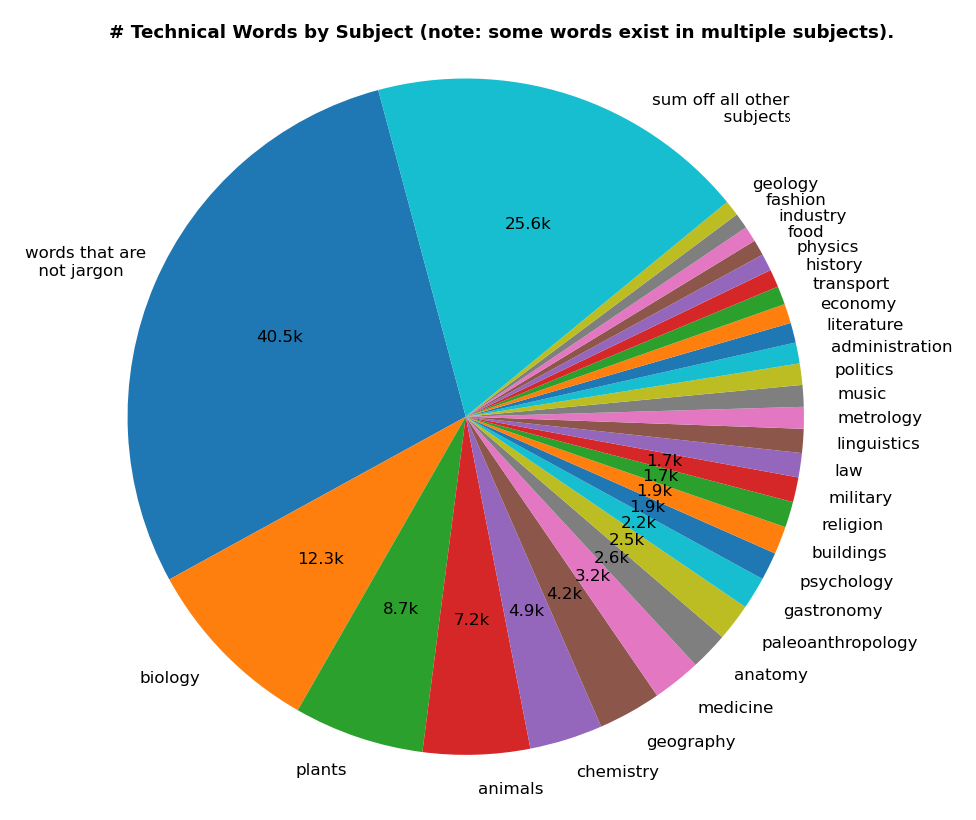
In compiling this work, I reviewed ethically sourced public domain datasets used by linguists, such as NLTK and WordNet. This allowed me to refine a set of 126 subjects (areas of study). Then I established which English words had a specific meaning in those domains. Summary results are shown in the graph below.
We use this chart to inform us which students would benefit most from this software.
Development History
This software started in 2013 when I needed a glossary generator for my PhD write up. I'm a computer scientist but my research, into electrical detection of human emotions, was cross-disciplinary with a lot of medical and psychological depth. Not relishing the idea of combing my 600-odd pages of work, for key terms the reader would need, I created my own glossary analysis algorithm.
Soon I discovered how powerful glossary analysis algorithms were, and started researching fact extraction techniques. Later that year I experimented with releasing a free crossword generator; and thought it would be awesome if the two things were combined into one product.
I had to put it down for a while, I had started a young family, and had to concentrate on my work at CSIRO and the Australian National University. Recently I moved with my family to a rural Queensland town, to live the country lifestyle. Now, 10 years after putting this work aside, I am very happy to be picking it up again.
Author's Note
This isn't another learning app
. It's a tool built by a former lecturer who got sick of
educational software that either treats students like kids who need a dopamine hit, or attempts to replace
teachers. This is not gamified homework. It's a focused, low stress, way to actually remember what you study.
If you're a parent looking for help, you may be confused by the price. It's a fraction of the cost normally charged for educational software. The reason is that this software is priced so students can afford it. Normal educational software positions itself as a substitute for private tuition, and understands you will pay for results. I am not selling to you, so there is no monthly fee. My proposition is that the amount asked is something a senior high school student can justify, as a tool that will aid them until they finish university. My business model is not preying on bank accounts of concerned parents.
If you're an educational institution, this software can definitely help teachers prepare coursework. There is no site/classroom licence option because this is a tool that helps students organise and perform. It's not intended as a substitute for teaching hours. If you see giving students a crossword, as a substitute for contact hours with an educator; or you see it as a way to reduce costs, please go find other software.
This software is built for you, the student. I sell it on Steam because I believe it's a place where great software can find a following. Steam offers a good refund policy, and regionally appropriate pricing, keeping this software affordable and accessible to all. I respect that.
Features
- Modern graphics and sleek interface.
- Import PDF and txt documents.
- Crosswords for any page range or chapter.
- Large library of pre-made crosswords.
- Export/Print crosswords as needed.
- All processing done locally, no cloud services, documents remain on your computer.
- Colorblind safe, high contrast mode, and dyslexic font support.
Technology
Downloads
Download the trailer (.mp4) Download all other images (.zip) Download this page and images (.zip)
Media
Trailer
Screenshots
All screenshots are available individually below, and as a single download.